Day 88 - DevOps Project 9 - Deploying Django To-do App on AWS EC2 with Kubernetes ClusterJan 16, 2024·4 min read
Day 90 - Challenge CompletedWe have completed the 90daysofdevops challenge where we learnt many tools and resources have a direct connection to Cloud and DevOps technological area. Let's go on a flashback of what we learnt in these three months. Flashback The tools that we lear...Jan 18, 2024·4 min read
Day 87 - DevOps Project 8 - Automating React App Deployment on AWS Elastic Beanstalk with GitHub ActionsJan 15, 2024·4 min read
Day 86 - DevOps Project 7 - Automating Portfolio Deployment on AWS S3 using GitHub ActionsJan 14, 2024·3 min read
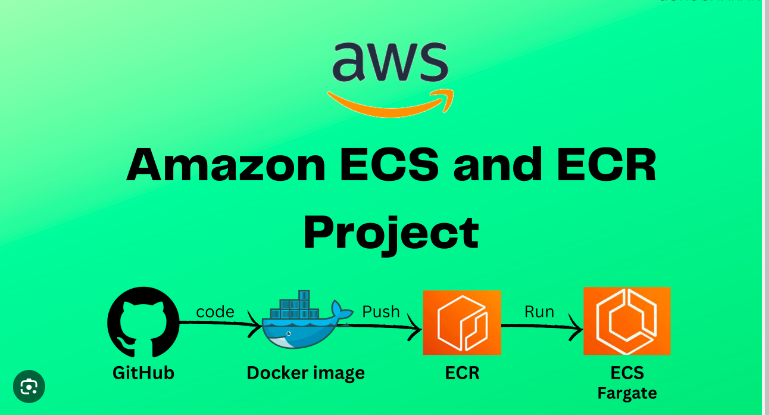
Day 85 - DevOps Project 6 - Deploying a Node.js App on AWS ECS Fargate and ECRProject Description In this project, our goal is to deploy a Node.js application on AWS ECS Fargate and store its Docker image in AWS ECR. Amazon ECS (Elastic Container Service) is a fully managed container orchestration service that enables you to e...Jan 13, 2024·5 min read
Day-84 Project-5 : Netflix applicationProject Description The project involves deploying a Netflix clone web application on a Kubernetes cluster, a popular container orchestration platform that simplifies the deployment and management of containerized applications. The project will requi...Jan 12, 2024·2 min read
Day-83: Project 4Project Description The project aims to deploy a web application using Docker Swarm, a container orchestration tool that allows for easy management and scaling of containerized applications. The project will utilize Docker Swarm's production-ready fe...Jan 11, 2024·2 min read
Project 3: Host a static website using AWS S3 bucket.Project Description The project involves hosting a static website using an AWS S3 bucket. Amazon S3 is an object storage service that provides a simple web services interface to store and retrieve any amount of data. The website files will be uploade...Jan 10, 2024·2 min read
Project 2: Implementation.Deploying web app using Jenkins CI/CD declarative pipeline. Follow the steps: First of all, go to the AWS portal, and create a new instance. As · Name: jenkins-server · AMI: ubuntu. · Instance type: t2.micro (free tier). · K...Jan 9, 2024·2 min read
Day 80 : Project 1- Automated Web Application Development and Deployment with Jenkins and GitHub IntegrationMain Highlights of this project: Provisioning 2 EC2 instances, designated as the Master Node and Worker Node. Configured Jenkins on the Master Node and installed Java on the Worker Node. Task allocation from the Master Node to the Worker Node for ...Jan 8, 2024·5 min read